
Electronic key battery
Replace the battery with a new one if it is depleted.
- You will need the following items:
• Flathead screwdriver
• Small Phillips-head screwdriver
• Lithium battery (CR1632)
- Replacing the battery
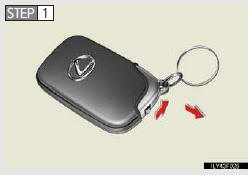
Take out the mechanical key.
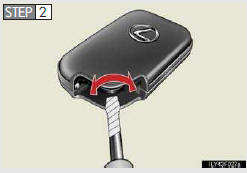
Remove the cover.
To prevent damage to the key, cover the tip of the screwdriver with a rag.
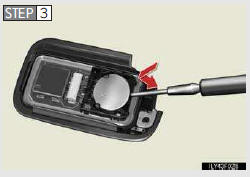
Remove the depleted battery.
Insert a new battery with the “+� terminal facing up.
- Use a CR1632 lithium battery
• Batteries can be purchased at your Lexus dealer, local electrical appliance shops or camera stores.
• Replace only with the same or equivalent type recommended by the manufac- turer.
• Dispose of used batteries according to the local laws.
- If the electronic key battery is discharged
The following symptoms may occur.
• The smart access system with push-button start and wireless remote control will not function properly.
• The operational range is reduced.
CAUTION
- Removed battery and other parts
Keep away from children. These parts are small and if swallowed by a child, they can cause choking. Failure to do so could result in death or serious injury.
NOTICE
For normal operation after replacing the battery
Observe the following precautions to prevent accidents.
• Always work with dry hands.
Moisture may cause the battery to rust.
• Do not touch or move any other components inside the remote control.
• Do not bend the battery terminals.
See also:
Key information
Keys
The following keys are provided with the vehicle.
1. Electronic keys
• Operating the smart access
system with push-button start.
• Operating the wireless
remote control function.
2. ...
If you have repair delays questions
If you have questions or concerns
about your vehicle’s California emission
warranty coverage, please follow
the steps described.
You may also request information
from or report complaints to: ...
If the shift lever cannot be shifted from “P�
If the shift lever cannot be shifted with your foot on the brake, there
may be a problem with the shift lock system (a system to prevent acci-
dental operation of the shift lever). Have the vehicle ...