
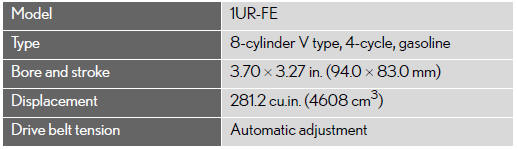
Engine
See also:
Off-road precautions
This vehicle belongs to the utility vehicle class, which has
higher ground clearance and narrower tread in relation to the
height of its center of gravity to make it capable of performing in
a wide ...
Operating HomeLink®
Press the appropriate HomeLink® button. The HomeLink® indicator light should
come on.
The HomeLink® compatible transceiver in your vehicle continues to send a signal
for up to 20 seconds as lo ...
Registering home
1. Push the “DEST� button.
2. Touch “Go Home�.
If home has not been registered, you can register it by touching “Go Home�.
3.Touch “Yes�.
4. There are 4 different methods t ...