
ECT Switch
Use the mode select switch to select the driving mode that best suits the driving and road conditions.
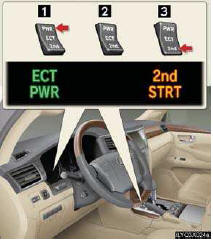
1 Power mode
For more powerful acceleration and uphill
driving.
2 Normal mode
3 “2nd STRT� (second start) mode
For starting or accelerating on snow-covered
roads or other slippery surfaces.
An indicator comes on when in power or second start mode.
See also:
Cruise Control
Cruise control allows the driver to maintain a constant speed without having
to operate the
accelerator pedal.
Use for highway driving or when traveling at a constant speed for long periods
of ...
Hands-free system (for cellular phone)
The hands-free system is a function that allows you to use your cellu-
lar phone without touching it.
This system supports Bluetooth® cellular phones. Bluetooth® is a
wireless data system that ...
Selecting a cellular phone to be used
Select “Connect Phone (Connect)�
using a voice command or the “TUNE/SEL� knob.
Pattern A
Select the cellular phone to be
used by either of the following methods, and select “Confirmâ ...