
Unlocking and locking the back door
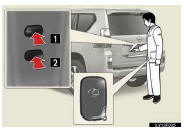
1.Locks the all doors
2. Unlocks the all doors
The doors cannot be unlocked for 3 seconds after the doors are locked.
See also:
Reporting safety defects for U.S. owners
If you believe that your vehicle has a defect which could cause a crash or could
cause injury or death, you should immediately inform the National Highway Traffic
Safety Administration (NHTSA) in ...
Set up screen
You can change the touch screen to your desired settings.
Press the “SETUP� button to display the “Setup� screen.
General settings
This screen is used for language selection and the o ...
Listing the registered data
Select “List Names� using a voice command or the “TUNE/SEL� knob.
The list of the registered data will be read aloud.
When listing is complete, the system returns to the “Phonebook�.
Pr ...