
Setting Bluetooth audio
The Bluetooth audio settings can be set.
Registering your portable player
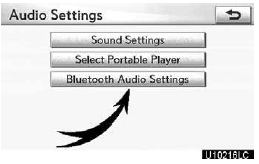
1. Touch “Bluetooth Audio Settings” on “Audio Settings” screen.
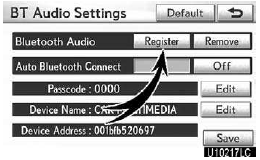
2. Touch “Register” of “Bluetooth Audio” on “BT Audio Settings” screen.
Bluetooth is a registered trademark of Bluetooth SIG.Inc.
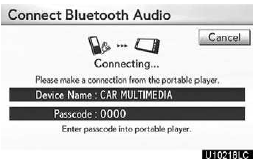
3. When this screen is displayed, enter the passcode displayed on the screen into the portable player.
For the operation of the portable player, see the manual that comes with it.
If you want to cancel the entry, touch “Cancel”.
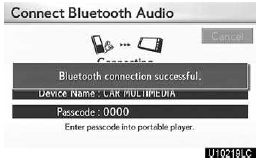
4. When the connection is complete, this screen is displayed.
You do not need to enter the portable player in case of using the same one.
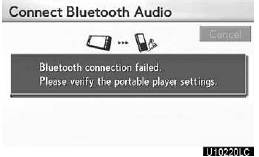
When this screen is displayed, follow the guidance on the screen to try connection again.
When another Bluetooth device is connected
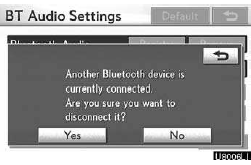
When the Bluetooth device is currently connected, this screen is displayed.
If you want to disconnect it, touch “Yes”.
INFORMATION
If the device corresponds with both Bluetooth phone and Bluetooth audio, register and connect the Bluetooth phone first or a connection failure may occur when registering the Bluetooth audio.
(a) Removing a Bluetooth audio
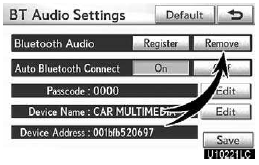
1. Touch “Remove” of “Bluetooth Audio” on “BT Audio Settings” screen.
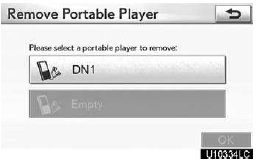
2. Select the portable player you want to delete and touch “OK”.
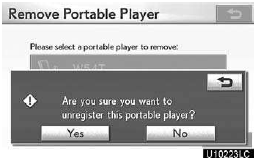
3. Touch “Yes” to unregister the selected portable player.
Bluetooth is a registered trademark of Bluetooth SIG.Inc.
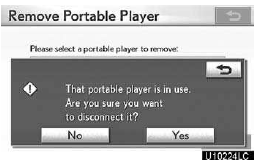
If the selected portable player is in use, this screen will appear. Touch “Yes”. The system will disconnect the portable player and remove it.
(b) Connecting Bluetooth audio
AUTOMATICALLY
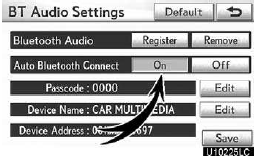
Touch “On” for “Auto Bluetooth Connect” to activate the automatic connection for the Bluetooth . Always set it to this mode and leave the Bluetooth portable player in a condition where connection can be established. The “Auto Bluetooth Connect” cannot be selected if the connection method is set to “From Portable Player”. Bluetooth is a registered trademark of Bluetooth SIG.Inc.
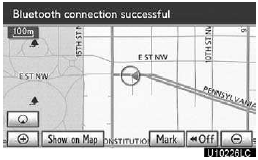
When the “ENGINE START STOP” switch is in ACCESSORY or IGNITION ON mode, the selected portable player will be automatically connected and the connection result is displayed
MANUALLY
When the auto connection fails or turns off, you have to connect Bluetooth manually.
For the manual operation, see page 248.
(c) Changing the passcode
The passcode for registering your portable player on the system can be changed. You can change this to a 4 to 8 digit number of your choice. The default is “0000”.
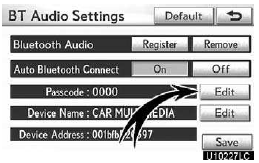
1. Touch “Edit” of “Passcode” on “BT Audio Settings” screen.
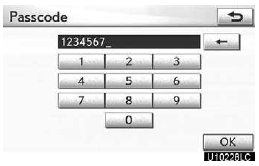
2. Enter the new 4−8 digits passcode and touch “OK”.
Each time you touch  , an input
digit is deleted.
, an input
digit is deleted.
(d) Changing the device name
You can change a device name. Even if you change a device name, the name registered in your portable player is not changed.
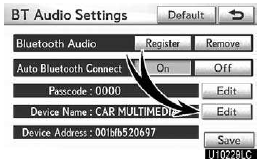
1. Touch “Edit” of “Device Name” on “BT Audio Settings” screen.
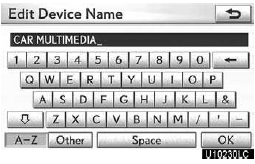
2. Enter the new device name and touch “OK”.
INFORMATION
The device names are common to Bluetooth audio and Bluetooth phone.
If you change the device name of the audio, the device name of the phone will change at same time.
However, passcodes can be set separately.
(e) Initializing the Bluetooth audio settings
You can initialize the settings.
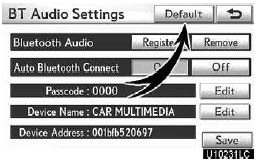
1. Touch “Default” on “BT Audio Settings” screen.
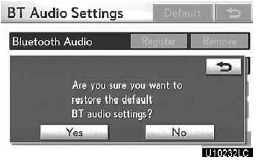
2. Touch “Yes”.
See also:
General settings
Used for language selection and the on/off settings of operation sounds and
automatic screen change.
1. Push the “SETUP” button.
2. Touch “General”.
3. Touch the items to be set.
4 ...
Adjusting the settings manually
- Basic setting
Vehicles without a rear automatic air conditioning system
To turn on the air conditioning
system and adjust the fan speed, press “
” on to increase the fan speed and ...
Deleting the registered data
Select “Delete Entry” using a voice
command or the “TUNE/ SEL” knob.
Pattern A
Select the data to be deleted by
either of the following methods, and select “Confirm” using a voice ...