
Anti-glare inside rear view mirror
In automatic mode, sensors are used to detect the headlights of vehicles behind and automatically reduce the reflected light.
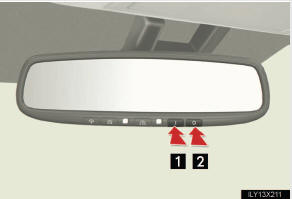
1 Turns automatic mode on
2 Turns automatic mode off
The indicator comes on when auto mode is turned on.
The mirror will revert to the auto mode each time the “ENGINE START STOP� switch is turned to IGNI-
Adjusting the height of the rear view mirror
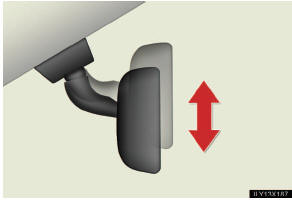
Adjust the height of the rear view mirror by moving it up and down.
- To prevent sensor error
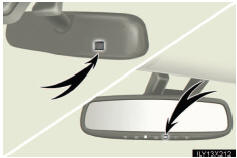
To ensure that the sensors operate properly, do not touch or cover them.
CAUTION
- While driving
Do not adjust the position of the mirror.
Doing so may lead to mishandling of the vehicle and an accident, resulting in death or serious injury.
See also:
Playing DVD video
Press the “DISC� button or select disc mode to display DVD video.
- Controller
1 Selecting an icon
2 Turning on the DVD mode
3 Inputting the selected icon
4 Playing/pausing a disc
5 Fast ...
Playing aaudio CD/CD text
- Display
Select disc mode on the
source screen to display the
control screen.
- Controller
1 Play/pause
2 Fast forward or rewind
3 Selecting a track (press)
Fast forward or rewind
(press ...
XM® Satellite Radio (if equipped)
- Receiving XM® Satellite Radio
Press the “SAT� button.
The display changes as follows each time the button is pressed:
“SAT1â€� → “SAT2â€� → “SAT3â€�
Turn the “TU ...