
Initialization
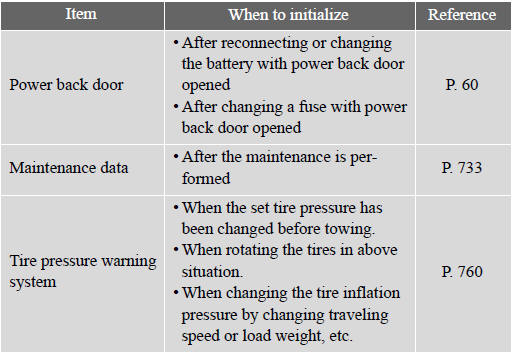
Items to initialize
The following items must be initialized for normal system operation in cases such as after the battery is reconnected, or maintenance is per- formed on the vehicle.
See also:
Radio operation
(a) Listening to the radio
Push the “AM·FM� button, or push the “AUDIO� button to display audio screen
and touch “AM� or “FM� tabs to choose either an AM or FM station.
“AM� ...
Operation flow: guiding the route
1 Press the “DEST� button.
2 here are 11 different methods to
search destinations.
►Page 1
►Page 2
3 Touch “Go to �.
The navigation system performs a search
for the ...
Seat belt instructions for Canadiaowners (iFrench)
The following is a French explanation of seat belt instructions
extracted from the seat belt section in this manual.
See the seat belt section for more detailed seat belt instructions
in English. ...