
Keys
■Electronic key
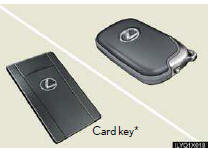
Smart access system with push-button start
*: If equipped
■Mechanical key
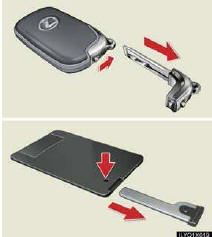
● Locks and unlocks the doors
● Locks and unlocks the glove box
The mechanical key is stored inside the electronic key. To extract the key, release the latch and pull or if equipped with a card key, press the button and pull.
■Wireless remote control
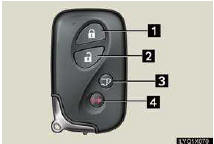
1 Press: locks all doors
2 Press once: unlocks the driver’s door
Press twice: unlocks all doors
3 Press and hold: opens and closes the back
door
4 Press and hold: sounds the alarm
(Use the alarm to attract attention to the vehicle
in order to help deter breaks-ins. To stop
the alarm, press any button on the wireless
remote control.)
See also:
Indicators and warning lights
The indicator and warning lights on the instrument cluster and center
panel inform the driver of the status of the vehicle’s various systems.
For the purpose of explanation, the following illust ...
Manage phone
“Manage phone� is accessed from the “Connect Phone� screen.
1. Push the “SETUP� button.
2. Touch “Phone�.
3. Touch “Manage Phone�.
Please refer to the following pages for e ...
California Emission Control Warranty
Vehicles equipped with a California Certified Emission Control System that
are registered and operated in California or any state that adopts California emission
warranty provisions are covered by ...