
Active TRAC/VSC Off Mode
This switch turns off the active traction control system or vehicle stability control system.
Use this switch if the wheels get stuck in snow, mud etc.
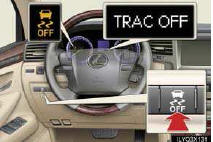
To turn off Active TRAC: Push the VSC OFF switch briefly. “TRAC OFF� will be shown on the multi-information display.
To turn off Active TRAC, VSC and Trailer Sway Control: Push and hold the VSC OFF switch for 3 seconds when the vehicle is not moving. The VSC OFF indicator light will come on and “TRAC OFF� will be shown on the multi-information display.
Push the button again to turn the system back on.
See also:
Using other driving systems
Cruise control
Use cruise control to maintain a set speed without depressing the
accelerator
pedal.
1. Indicator.
2. Display.
3. Cruise control switch.
Setting the vehicle speed
Press the ...
Type C: function achieved by using DCM
Of the functions included with Lexus Enform with Safety Connect, Safety
Connect
can be achieved by using DCM.
For details, refer to “Owner’s Manual�. ...
How do I request arbitration?
To initiate arbitration, you must complete an NCDS customer claim form and mail
it to NCDS. A claim form is included in the Lemon Law Guide located in your vehicle,
or you may request a form by ca ...