
If the electronic key does not operate properly
■Unlocking and locking the doors
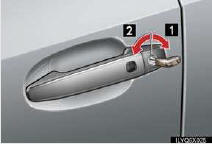
To unlock or lock the vehicle, use the mechanical key. The mechanical key is stored inside the electronic key.
1 Unlocks
2 Locks
■Starting the engine
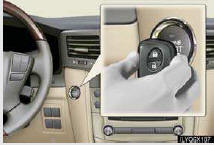
1 Depress the brake pedal.
2 Touch the Lexus emblem side of the electronic
key to the “ENGINE START STOP� switch.
3 Press the “ENGINE START STOP� switch
within 10 seconds after the buzzer sounds,
keeping the brake pedal depressed.
If the electronic key battery becomes depleted, replace it with a new battery. For instructions on replacing the battery, refer to the Owner’s Manual. If you need further assistance, contact your Lexus dealer.
See also:
Towing with a sling-type truck
Do not tow with a sling type truck to prevent body damage.
...
Checking and replacing fuses
If any of the electrical components do not operate, a fuse may have
blown. If this happens, check and replace the fuses as necessary.
Turn the “ENGINE START STOP�
switch OFF.
The fuses are lo ...