
Playing MP3 and WMA discs
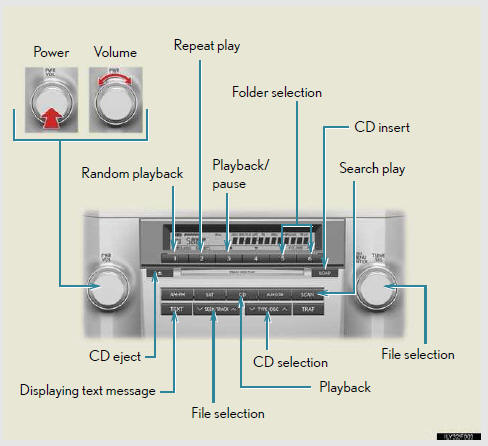
Loading and ejecting MP3 and WMA discs
Selecting MP3 and WMA discs
- Selecting and scanning a folder
- Selecting and scanning files
- Random playback
- Repeat play
- Switching the display
See also:
Front passenger occupant classification system
Your vehicle is equipped with a front passenger occupant classification system.
This system detects the conditions of the front passenger seat and activates
or deactivates the devices for the front ...
Natural speech information (English only)
Due to natural language speech recog-
nition technology, this system enables
recognition of a command when spoken
naturally. However, the system cannot
recognize every variation of each com-
mand ...
Have the vehicle inspected by your Lexus dealer immediately.
A buzzer sounds and a warning message is shown on the multi-informa- tion display.
Failure to investigate the cause of the following warnings may lead to the system
operating abnormally and possib ...