
Glove box
The glove box can be opened by pulling the lever and can be locked and unlocked by using the mechanical key.
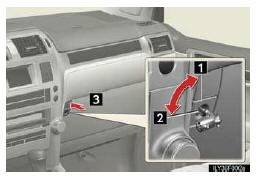
1. Lock
2. Unlock
3. Open
- Glove box light
The glove box light turns on when the tail lights are on.
CAUTION
- Caution while driving
Keep the glove box closed. In the event of sudden braking or sudden swerving, an accident may occur due to an occupant being struck by the open glove box or the items stored inside.
See also:
Volume setting
You can adjust the voice and ring volume.
1. Touch “Volume�.
2. Change each setting according to the following procedures.
3. When you complete all settings, touch “Save�.
Automatic vo ...
Replacing the Key
Your Lexus dealer can generate replacement keys. Certain bonded/ registered locksmiths
may also be able to generate replacement keys.
When ordering a new key, bring all keys for the vehicle to your ...
Cooling system
...