
Luggage compartment features
- Cargo hooks
Vehicles without third seats
Raise the hook to use.
The cargo hooks are provided for securing loose items.
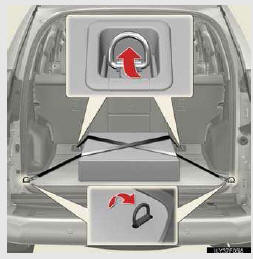
Vehicles with third seats
Raise the hook to use.
The cargo hooks are provided for securing loose items.
When using the deck hooks, the third seat must be fold down.
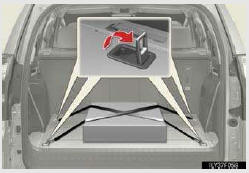
- Warning reflector holder
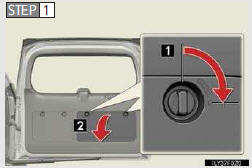
1. Turn the knob clockwise.
2. Open the lid.
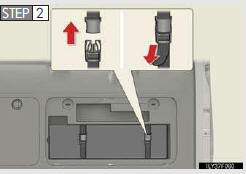
Secure the warning reflector.
The warning reflector itself is not included as an original equip- ment.
- Cargo net hooks
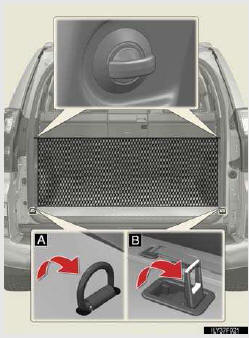
 Vehicles without third seats
 Vehicles with third seats
To hang the cargo net, use the cargo net hooks.
The cargo net itself is not included as an original equip- ment.
- Auxiliary box (if equipped)
Remove the cover.
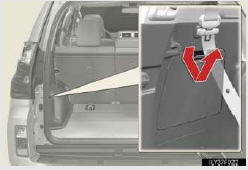
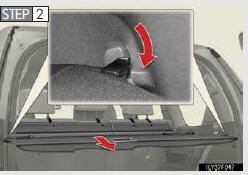
- Luggage cover (if equipped)
Vehicles without third seats
Attach the hooks to the head restraints.
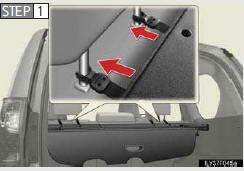
Vehicles with third seats
Attach the hooks to the head restraints.
When using the luggage cover, the third seats must be fold down.
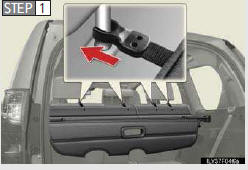
Pull out the luggage cover and hook it on the anchors.
See also:
Seat heaters and ventilators
The seat heaters and ventilators heat the seats and maintain good airflow
by blowing air from the seats.
- Front seat heaters/ventilators
1. Turns the seat heater on
The indicator light c ...
Checking and replacing fuses
If any of the electrical components do not operate, a fuse may have blown.
If this happens, check and replace the fuses as necessary.
Turn the “ENGINE START STOP� switch
off.
Open the fuse ...
Transferring a call
A call can be transferred between the cellular phone and system while dialing,
receiving a call, or during a call. Use one of the following meth- ods:
a. Operate the cellular phone.
Refer to the m ...