
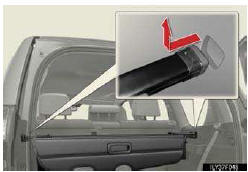
Removing the luggage cover
The luggage cover can be removed by following the procedure below.
Retract the cover and release both ends, then lift it out.
Vehicles without third seats: After removing the luggage cover, place it somewhere other than the pas- senger compartment.
See also:
Operation flow: guiding the route
1. Push the “DEST� button.
2. There are 11 different methods to search destinations.
See “Destination search� on page 62.
3. Touch “Go to �.
The navigation system performs a se ...
XM Stocks
XM Stocks is a service included with an
XM Satellite Radio subscription. This
service is also available with an XM
TravelLink subscription. With this ser-
vice, you can receive updates via the
na ...
Using the radio (internet radio broadcast)
One of Apps’ features is the ability to listen to internet radio. In order
to use this service, an Apps compatible phone and the navigation system
needs to be set. For details, refer to the “Nav ...