
Unlocking and locking the back door
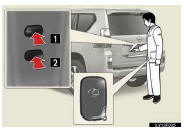
1.Locks the all doors
2. Unlocks the all doors
The doors cannot be unlocked for 3 seconds after the doors are locked.
See also:
Optimal use of the audio /video system
Touch to adjust the
sound settings.
►“Soundâ€� tab
1, 2, 3 Touch “-� or “+� to
adjust the treble, mid
or bass.
4, 5 Touch “Front� or “Rear�
to adjust the front/rear ...
Power Windows
1 Window lock switch
The window lock switch disables the operation
of all windows other than the driver’s
door window.
2 Power window switches
To open: press the switch.
To close: pull the ...
If the vehicle becomes stuck
Carry out the following procedures if the tires spin or the vehicle becomes
stuck in mud, dirt, or snow:
Stop the engine. Set the parking
brake and shift the shift lever to P.
Remove the mud, ...