
Vehicle customization
Vehicle settings can be changed.
1. Push the “SETUP� button.
2. Touch “Vehicle� on the “Setup� screen.
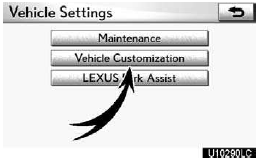
3. Touch “Vehicle Customization�.
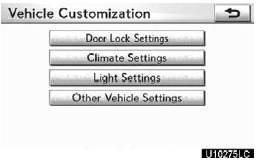
4. Select the setting to be changed.
Various settings can be changed. For a list of the settings that can be changed, see the vehicle owner’s manual.
5. After changing the settings, touch “Save�.
A message indicating that the settings are being saved will appear. Do not perform any other operations while this message is displayed.
CAUTION
When performing the customization procedure, ensure that there is sufficient ventilation in the vehicle and surrounding area. If there is insufficient ventilation, exhaust gases may collect and enter the vehicle. Exhaust gases include harmful carbon monoxide (CO) and inhaling them may lead to death or a serious health hazard.
INFORMATION
Stop the vehicle in a safe place, set the parking brake and put the shift lever in “P�. To avoid discharging the battery, perform the customization procedure with the engine running.
See also:
Call on the Bluetooth phone
After you enter the Bluetooth phone, you can call by using hands−free system.
You can call using the 6 methods described below.
By dial
You can call by inputting the phone number.
This canno ...
If your vehicle fails a smog-check test
If your vehicle fails a smog-check test,
you may make a claim under the
Emission Performance Warranty. To
do so, take your vehicle to an authorized
Lexus dealership and present
a copy of the smog ...
Weight limits
• The gross trailer weight must never exceed 6500 lb. (2948 kg).
• The gross combination weight must never exceed 13100 lb. (5492 kg).
• The gross vehicle weight must never exceed the GVWR i ...