
Windshield wiper de-icer
This feature is used to prevent ice from building up on the windshield and wiper blades.
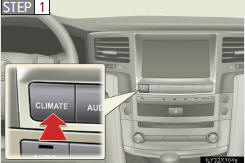
Press the “CLIMATE� but- ton.
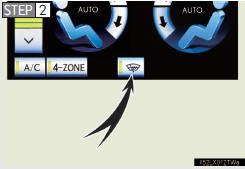
On/off
The windshield wiper de-icer
will automatically turn off
after approximately 15 min-
utes. Touching the switch
again also turns the de-icer
off.
- The windshield wiper de-icer can be operated when
The “ENGINE START STOP� switch is in IGNITION ON mode.
CAUTION
- When the windshield wiper de-icer is on
Do not touch the glass at the lower part of the windshield or to the side of
the front pillars as the surfaces can become very hot and burn you.
See also:
Luggage compartment features
- Cargo hooks
Cargo hooks are provided for
securing loose items.
- Cargo net hooks
To hang the cargo net, use the
cargo net hooks and rear
cargo hooks.
The cargo net itself is not
includ ...
Intuitive parking assist setting
The volume of the beeps and turning on or off of the display can be set.
1. Push the “SETUP� button.
2. Touch “Vehicle� on the “Setup� screen.
3. Touch “LEXUS Park Assist�.
4. ...
Gauges and meters
The units used on the speedometer may differ depending on the target
region.
1 Tachometer
Displays the engine speed in revolutions per minute
2 Engine coolant temperature gauge
Displays the e ...