
Instrument cluster light control switch
The brightness of the instrument cluster lights can be adjusted.
1. Brighter
2. Darker
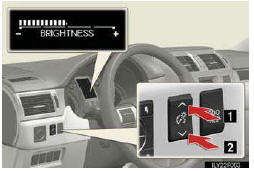
The meters and display illuminate when
The “ENGINE START STOP� switch is in IGNITION ON mode.
Instrument cluster brightness adjustment
The instrument cluster brightness levels when the tail lights are on and off can be adjusted.
The brightness of the instrument cluster lights
When the tail lights are on, the brightness will change. However, when the sur- roundings are bright (daytime, etc.) turning on the tail lights will not change the instrument cluster brightness.
In addition, the brightness of the instrument cluster lights is automatically adjusted based on the light sensor detecting how bright the surroundings are.
When disconnecting and reconnecting battery terminals
The trip meter data will be reset.
If the trip meter was displayed last, the ODO screen will be displayed after reset- ting.
Customization
Setting of sensitivity of the ambient light sensor used for dimming the meter lights can be changed.
NOTICE
To prevent damage to the engine and its components
• Do not let the indicator needle of the tachometer enter the red zone, which indi- cates the maximum engine speed.
• The engine may be overheating if the engine coolant temperature gauge is in the red zone (H). In this case, immediately stop the vehicle in a safe place, and check the engine after it has cooled completely.
See also:
Address book
Navigation settings
Points or areas on the map can be registered.
The registered points can be used on the
“Destination� screen.
Registered areas to avoid, will be avoided
when the system ...
Floor mat
Use only floor mats designed specifically for vehicles of the same model and
model year as your vehicle. Fix them securely in place onto the carpet.
Fix the floor mat in place using the retaining h ...
Opening the fuel tank cap
Perform the following steps to open the fuel tank cap.
Before refueling the vehicle
Turn the “ENGINE START STOP� switch off and ensure that all the doors and windows
are closed.
Opening the f ...