
Range covered by each camera
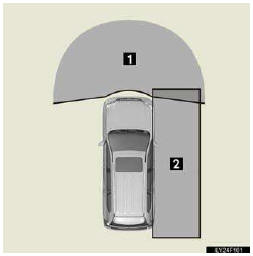
1. Wide view front monitor
2. Side monitor
The illustration shown here is an example. As such, the actual visible area may be different. See P. 294 for information about the visual range of each camera.
See also:
Theft Deterrent System
The theft deterrent system includes the following features to help protect
your vehicle from
theft.
■Immobilizer system
The immobilizer system prevents the engine from
being started in t ...
Quick reference (“Setup� screen)
The items shown on the “Setup� screen can be set. To display the “Setup� screen,
push the “SETUP� button.
1. “General�
Settings are available for language selection, operation so ...
Quality Control
You may have noticed a few miles on
the odometer when you took delivery
of your Lexus. This mileage is a result
of the comprehensive process used to
ensure the quality of your vehicle. This
proce ...