
Playing MP3 and WMA discs
Lexus GX / Lexus GX Owners Manual / Interior features / Using the audio system / Playing MP3 and WMA discs
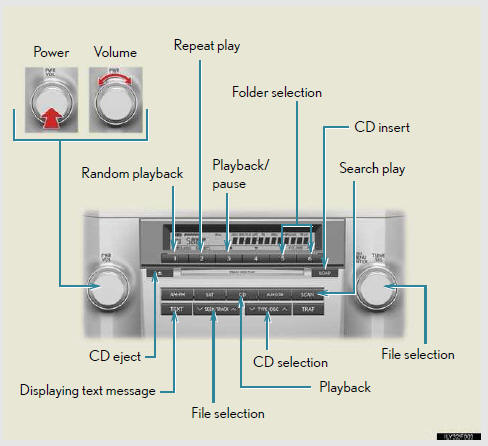
Loading and ejecting MP3 and WMA discs
Selecting MP3 and WMA discs
- Selecting and scanning a folder
- Selecting and scanning files
- Random playback
- Repeat play
- Switching the display
See also:
Power easy access system
When the driver enters and exits the vehicle, the driver’s seat and steer- ing
wheel will automatically perform the following operations:
Exiting the vehicle: When all of the following actions ...
Maintenance
You are responsible for performance
of the required maintenance indicated
in the Owner’s Manual and this guide.
Lexus will not deny a warranty claim
solely because you do not have
records to ...
RDS (Radio Data System)
This feature allows your radio to receive station identification information
and program information (classical, jazz, etc.) from radio stations which broadcast
this information.
- Receivin ...