
Personal/interior light main switch
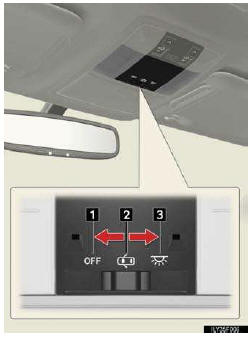
1. OFF
The personal/Interior lights and interior light can be individually turned on or off.
2. Door position
The personal/interior lights come on when a door is opened. They turn off when the doors are closed.
3. On
The personal/interior lights cannot be individually turned off.
See also:
DVD changer operation
For safety reasons, you can enjoy DVD video discs, DVD audio discs and video
CDs only when the vehicle is completely stopped with the “ENGINE START STOP� switch
is in ACCESSORY or IGNITION ON ...
How long is the arbitration process?
The entire process — from the time NCDS receives your request for arbitration
to the arbitrator’s decision — is designed to take no more than 40 days. A decision
may be delayed if:
• You ...
Route trace
It is possible to store the traveled route up to 124 miles (200 km) and retrace
the route on the display.
:INFORMATION
This feature is available on the map with more detailed map scale than 30
m ...