
Sun visors
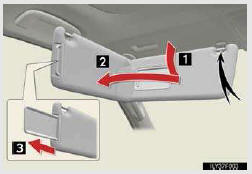
1. To set the visor in the forward position, flip it down.
2. To set the visor in the side position, flip down, unhook, and swing it to the side.
3. To use the side extender, place the visor in the side position, then slide it back- ward.
See also:
Information display
MAP DATABASE VERSION AND COVERAGE AREA
Coverage areas and legal information
can be displayed and map data can be
updated.
1 Press the “INFO� button.
2 Touch “Map Data�.
●The †...
Foot print map
For the area which is covered by the foot print map (Some areas in the following
cities: Detroit, Chicago, N.Y., L.A), you can switch to the foot print map on a
scale of 75 feet (25 m).
To switch ...
If the vehicle battery is discharged
If you have a set of jumper (or booster) cables and a second vehicle with a 12
volt battery, you can jump start your Lexus by following the steps below.
Open the hood.
Connecting the jumper cab ...