
Clock
Vehicles with a navigation system
Refer to the “Navigation System Owner’s Manual�.
Vehicles without a navigation system
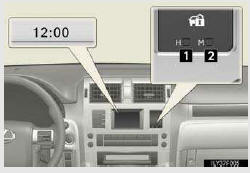
1. Adjusts the hours
2. Adjusts the minutes
- The clock is displayed when
The “ENGINE START STOP� switch is in IGNITION ON mode.
- When disconnecting and reconnecting battery terminals
The clock data will be reset.
See also:
Winter driving tips
Carry out the necessary preparations and inspections before driving
the vehicle in winter. Always drive the vehicle in a manner appropriate
to the prevailing weather conditions.
- Pre-winter prep ...
Front differential
*: Your Lexus vehicle is filled with “Toyota Genuine Differential Gear Oil� at
the factory.
Use Lexus approved “Toyota Genuine Differential Gear Oil� or an equivalent of
matching qualit ...
Fuel pump shut off system
To minimize the risk of fuel leakage when the engine stalls or an airbag
inflates upon collision, the fuel pump shut off system stops supplying
fuel to the engine.
Follow the procedure below to res ...