
Seat heaters and ventilators
The seat heaters and ventilators heat the seats and maintain good airflow by blowing air from the seats.
- Front seat heaters/ventilators
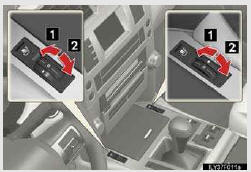
1. Turns the seat heater on
The indicator light comes on.
The higher the number of dots, the warmer the seat becomes.
2. Blows air from the seat
The indicator light comes on.
The higher the number of dots, the stronger the airflow becomes.
- Outer second seat heaters (if equipped)
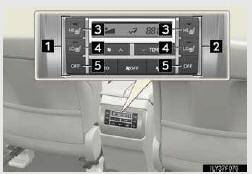
1. For left second seat
2. For right second seat
3. High heating temperature
4. Low heating temperature
To turn on the seat heater, press “HI� or “LO�.
The indicator light on “HI� or “LO� switch indicates that the seat heater is on.
5. Off
To turn off, press “OFF�.
- The seat heaters/ventilators can be used when
The “ENGINE START STOP� switch is in IGNITION ON mode.
- When not in use
Turn the dial until the indicator light turns off.
CAUTION
- Burns
• Use caution when seating the following persons in a seat with the seat heater on to avoid the possibility of burns:
• Babies, small children, the elderly, the sick and the physically challenged
• Persons with sensitive skin
• Persons who are fatigued
• Persons who have taken alcohol or drugs that induce sleep (sleeping drugs, cold remedies, etc.)
• Do not cover the seat with anything when using the seat heater.
Using the seat heater with a blanket or cushion increases the temperature of the seat and may lead to overheating.
• Do not use the seat heater more than necessary. Doing so may cause minor burns or overheating.
NOTICE
- To prevent damage to the seat heaters and ventilators
Do not put heavy objects that have an uneven surface on the seat and do not stick sharp objects (needles, nails, etc.) into the seat.
- To prevent battery discharge
Turn the seat heaters and ventilators off when the engine is not running.
See also:
Safety Connect
Safety Connect is a subscription-based telematics service that uses Global
Positioning System (GPS) data and embedded cellular technology to provide safety
and security features to subscribers. Sa ...
Map database information and updates
This system uses the maps of DENSO.
END USER LICENSE AGREEMENT
PLEASE READ THIS AGREEMENT
CAREFULLY BEFORE USING THE
NAVIGATION SYSTEM
THIS IS A LICENSE AGREEMENT
FOR YOUR COPY OF THE
SPATIAL M ...
Pausing and resuming guidance
To pause guidance
1. Touch “Route�.
2. Touch “Pause Guidance�.
The screen will return to the current position map without route guidance.
INFORMATION
Without route guidance, “Paus ...