
Electrical system
Lexus GX / Lexus GX Owners Manual / Vehicle specifications / Specifications / Maintenance data (fuel, oil level, etc.) / Electrical system
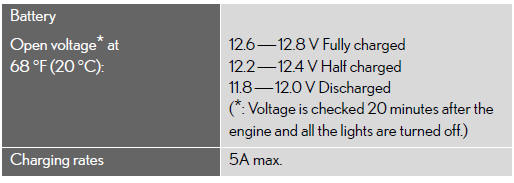
See also:
Quick reference (“Information� screen)
This screen can be used to display the calendar and information on operation
of the hands−free phone, etc. To display the “Informationâ€� screen, push the “INFO/PHONEâ€�
button.
1. †...
Scrapping of your Lexus
The SRS airbag and seat belt pretensioner devices in your Lexus contain explosive
chemicals. If the vehicle is scrapped with the airbags and seat belt pretensioners
left as they are, this may caus ...
What is covered and how long
Basic Warranty
This warranty covers repairs and
adjustments needed to correct
defects in materials or workmanship
of any part supplied by Lexus, subject
to the exceptions indicated under
“What ...