
Unlocking and locking the doors
► Side door handle
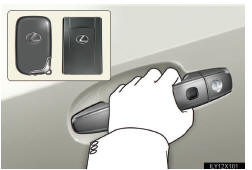
Grip the driver’s door handle to unlock the door. Grip the pas- senger’s door handle to unlock all the doors.* Make sure to touch the sensor othe back of the handle.
The door cannot be unlocked for 3 seconds after the door is locked.
*: The door unlock settings can be changed.
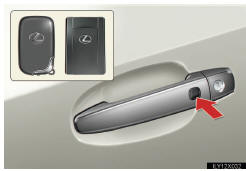
Press the lock buttoto lock the doors.
Pressing and holding the button closes the windows and moon roof. (This setting must be cus- tomized at your Lexus dealer.)
►Back door
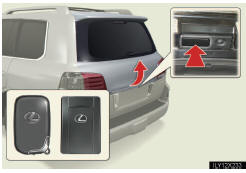
Press the unlock buttoto unlock the doors.
The door cannot be unlocked for 3 seconds after the door is locked.
Lock the back door agaiwhen you leave the vehicle. The back door will not lock automatically after it has beeopened and theclosed.
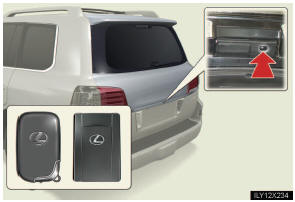
Press the lock buttoto lock the doors.
See also:
The Smart Key
Your Lexus vehicle was made with two “Smart Keys� and an aluminum key-number
plate. Each Smart Key includes an electronic main key that has an integrated mechanical
back-up key. The electronic ...
Inputting letters and numbers/List screen operation
When searching for an address or a name, or entering, letters and numbers can
be input via the screen.
INFORMATION
Keyboard layout can be changed.
(See page 332.)
To input letters and numbers
T ...
SRS airbags
The SRS airbags inflate when the vehicle is subjected to certain types of
severe impacts that may cause significant injury to the occupants. They work together
with the seat belts to help reduce t ...