
Front seats
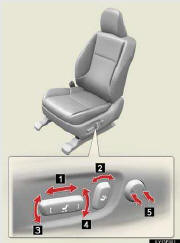
1. Seat position adjustment switch
2. Seatback angle adjustment switch
3. Seat cushion (front) angle adjustment switch
4. Vertical height adjustment switch
5. Lumber support adjustment switch
See also:
Operating the lights and windshield wipers
Headlight switch
The headlights can be operated manually or automatically.
- U.S.A.
1. Turn off the daytime
running light system.
2. The headlights and
side marker, parking,
tail, license pla ...
Driving assist systems
To help enhance driving safety and performance, the following systems operate
automatically in response to various driving situations. Be aware, however, that
these systems are supplementary and s ...
Initialization
Items to initialize
The following items must be initialized for normal system operation in cases
such as after the battery is reconnected, or maintenance is performed on the vehicle.
...