
Power easy access system
When the driver enters and exits the vehicle, the driver’s seat and steer- ing wheel will automatically perform the following operations:
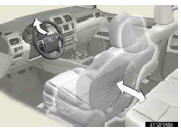
Exiting the vehicle: When all of the following actions have been per- formed, the steering wheel will move up and back to the point far- thest away from the driver and the seat will move backward (auto away function):
• The shift lever has been shifted to P
• The “ENGINE START STOP� switch has been turned off
• The driver seat belt has been unfastened
Entering the vehicle: When either of the following actions has been performed, the steering wheel will move toward the driver and seat will move forward (auto return function):
• The “ENGINE START STOP� switch has been turned to ACCES- SORY mode
• The driver seat belt has been fas- tened
See also:
Maintenance requirements
To ensure safe and economical driving, day-to-day care and regular maintenance
are essential. It is the owner’s responsibility to perform regular checks. Lexus
recommends performing the followin ...
Uniform Tire Quality Grading
This information has been prepared in accordance with regulations issued by the
National Highway Traffic Safety Administration of the U.S.
Department of Transportation.
It provides the purchasers ...
Cup holders
For front seats
Press down and release the cup holder lid.
You can remove the holder inside.
For second seats (vehicles without third seats)
Pull the armrest down.
For second seats (vehicles ...