
Range covered by each camera
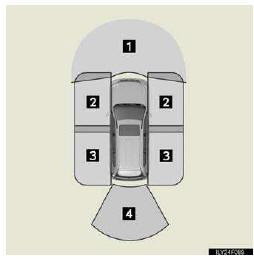
1. Front monitor
2. Side-front simultaneous display monitor
3. Side-rear simultaneous display monitor
4. Rear monitor
The illustration shown here is an example. As such, the actual visible area may be different. See P. 313 for information about the visual range of each camera.
See also:
Using the call history memory
Follow the procedure below to use a number stored in the call history memory:
Press the talk switch and say “Redial�
(when using a number stored in the outgoing call history memory) or “Call ...
Explanation of maintenance items
The following descriptions are provided
to give you a better understanding
of the maintenance services that
should be performed on your vehicle.
The scheduled maintenance log indicates
at which ...
Locking the driver’s door from the outside without a key
Move the inside lock button to the
lock position.
Close the door.
The door cannot be locked if the “ENGINE START STOP� switch is in ACCESSORY or
IGNITION ON mode, or the electronic key is ...