
Rear automatic air conditioning system∗
Air outlets and fan speed are automatically adjusted according to the temperature setting.
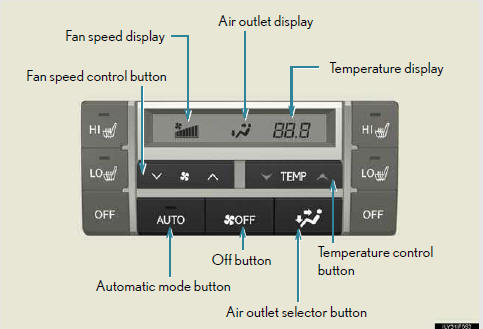
- Using automatic air conditioning system
- Adjusting the settings manually
- Adjusting the position and opening and closing the air outlets
See also:
Seat heaters and ventilators
The seat heaters and ventilators heat the seats and maintain good airflow
by blowing air from the seats.
- Front seat heaters/ventilators
1. Turns the seat heater on
The indicator light c ...
Hands-free System (For Cellular Phone)
■Bluetooth® phone pairing
Compatible Bluetooth®-equipped phones can be connected to the vehicle,
enabling
hands-free operation. Please refer to the cellular phone manufacturer’s user
g ...
Cool box
While the engine is running, the cool box, which is cooled by the air
conditioning, can be used.
Lift the lid while pulling up
the lower lever to release the
lock.
On/off
When on, the indica ...