
Cool box
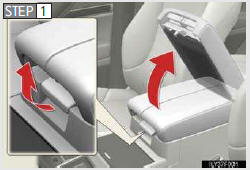
Lift the lid while pulling up the lower lever to release the lock.
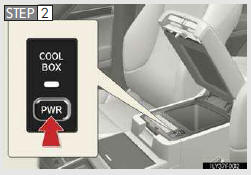
Turns the cool box on/off
When on, the indicator light comes on.
- The cool box can be operated when
The “ENGINE START STOP� switch is in IGNITION ON mode.
- When the cool box is turned on
Turning cool box on also turns on front air conditioning system.
- Items unsuitable for the cool box
• Drinks in unsealed containers
• Fragile items, perishables or anything with strong odor
• Owner’s manual, electronic devices, CDs, etc.
- When the indicator light flashes
The cool box is not operated when any of the following conditions occurs.
• When the air conditioning system is off
Turn the air conditioning system on also turns on the cool box.
• When outside air temperature is about 32 °F (0 °C) or below.
• When the “A/C ONâ€� in the multi-information display (accessory meter) (→P. 398) also flashes Press the “A/Câ€� button to turn off the cooling and dehumidification function and turn it on again.
If the indicator light continues to flash, there may be a malfunction in the system.
Turn the air conditioning system off and have it inspected by your Lexus dealer.
- When using the cool box lid as an armrest
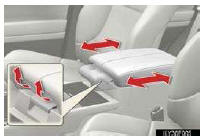
Slide the cool box lid forward or backward as needed. Slide the lid while pulling up the upper lever to release the lock.
CAUTION
- Caution while driving
Keep the cool box closed. In the event of sudden braking or sudden swerving, an accident may occur due to an occupant being struck by the open cool box or the items stored inside.
NOTICE
- To prevent battery discharge
Do not leave the cool box on longer than necessary when the engine is stopped.
See also:
Power outlet (12 V DC)
The power outlet can be used for 12 V accessories that run on less than 10
A.
Center cluster
Slide the auxiliary box lid.
- The power outlet can be used when
The “ENGINE START STOP†...
Pre-collision seat belts (front seats of vehicles with pre-collision system)
If the pre-collision sensor detects that a collision is unavoidable, the pre-
collision system will retract the seat belt, thus enhancing the effectiveness of
the seat belt pretensioner in a crash ...
Theft Deterrent System
The theft deterrent system includes the following features to help protect
your vehicle from
theft.
■Immobilizer system
The immobilizer system prevents the engine from
being started in t ...