
Overhead console
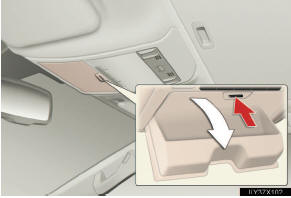
Press the button.
The overhead console is useful for temporarily storing small items.
CAUTION
- While driving
Do not leave the overhead console open.
Items may fall out and cause injury.
See also:
Hood
Release the lock from the inside of the vehicle to open the hood.
Pull the hood release lever.
The hood will pop up
slightly.
Lift the hood catch and lift
the hood.
CAUTION
- Pre-driving ...
Complimentary Services
To help ensure that your ownership experience is pleasant, convenient and trouble-free,
Lexus provides you with a variety of complimentary ser - vices. These services are
described on the followin ...
AVS (Adaptive Variable Suspension System)
AVS controls the suspension according to the road and driving conditions.
Selecting an optimum driving mode allows good riding comfort and stability.
1. Sport mode
For winding mountain road driv- ...