
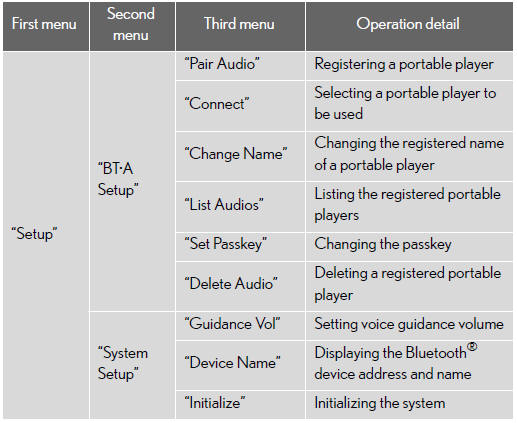
Menu list of the Bluetooth® audio system
- Normal operation
- When using a voice command
For numbers, say a combination of single digits from zero to nine.
Say the command correctly and clearly
- Situations that the system may not recognize your voice
• When driving on rough roads
• When driving at high speeds
• When air is blowing out of the vents onto the microphone
• When the air conditioning fan emits a loud noise
- Operations that cannot be performed while driving
• Operating the system with the “TUNE/SEL� knob
• Registering a portable player to the system
- Changing the passkey
See also:
Tires and wheels
...
Destination search by “Address Book�
1. Push the “DEST� button.
2. Touch “Address Book� on the “Destination� screen.
A list of registered address book entries is displayed.
3. Touch the button of the desired address book ...
Floor mat
Use only floor mats designed specifically for vehicles of the same model and
model year as your vehicle. Fix them securely in place onto the carpet.
Fix the floor mat in place using the retaining h ...