
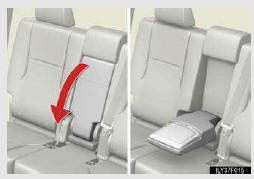
Armrest
Fold down the armrest for use.
NOTICE
- To prevent damage to the armrest
Do not apply too much load on the armrest.
See also:
Rear view monitor system
The rear view monitor assists the driver by displaying an image of the area
behind the vehicle while reversing. The image is displayed in reverse on the screen.
This reversed image is a similar im ...
Vehicle Service History
When you have your vehicle serviced
at a Lexus dealership, your service
information is recorded in the Lexus
National Service History database.
This is the first database of its kind in
the aut ...
Audio system type
CD and DVD player with AM/FM radio
Press “AUDIO� and touch each tab to display the audio control
screen.
Using the voice command system
Press or
to oper-
ate the voice command system ...