
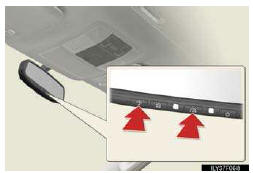
Erasing the entire HomeLink® memory (all three programs)
Press and hold the 2 outside but- tons for 10 seconds until the indi- cator light flashes.
If you sell your vehicle, be sure to erase the programs stored in the HomeLink® memory.
- Before programming
• Install a new battery in the remote control transmitter.
• The battery side of the remote control transmitter must be pointed away from the HomeLink® button.
- Certification for the garage door opener
For vehicles sold in the U.S.A.
FCC ID: NZLWZLHL4
FCC ID: NZLOBIHL4
NOTE:
This device complies with Part 15 of the FCC Rules.
Operation is subject to the following two conditions: (1) This device may not cause harmful interference, and (2) this device must accept any interference received, including interference that may cause undesired operation.
FCC WARNING:
Changes or modifications not expressly approved by the party responsible for compliance could void the user’s authority to operate the equipment.
For vehicles sold in Canada
NOTE:
Operation is subject to the following two conditions: (1) this device may not cause interference, and (2) this device must accept any interference, including interfer- ence that may cause undesired operation of the device.
- When support is necessary
Visit on the web at www.homelink.com or call 1-800-355-3515.
CAUTION
- When programming a garage door or other remote control device
The garage door or other devices may operate, so ensure people and objects are out of danger to prevent potential harm.
- Conforming to federal safety standards
Do not use the HomeLink® compatible transceiver with any garage door opener or device that lacks safety stop and reverse features as required by federal safety standards.
This includes any garage door that cannot detect an interfering object. A door or device without these features increases the risk of death or serious injury.
See also:
Perchlorate Material
Special handling may apply, See www.dtsc.ca.gov/hazardouswaste/perchlorate.
Your vehicle has components that may contain perchlorate. These components may
include airbag, seat belt pretensioners, a ...
Registering ID codes
The tire pressure warning valve and transmitter is equipped with a unique ID
code. When replacing a tire pressure warning valve and transmitter, it is necessary
to register the ID code. Have the I ...
Power outlet (120 V AC)
The power outlet can be used for 120 V AC accessories that run on less than
100 W.
Luggage compartment (vehicles without third seats)
Luggage compartment (vehicles with third seats)
- T ...