
Taking out the tool box
Lexus GX / Lexus GX Owners Manual / When trouble arises / Steps to take in an emergency / If you have a flat tire / Taking out the tool box
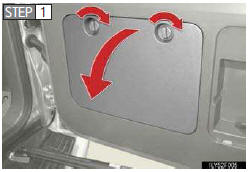
Remove the cover.
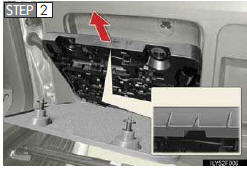
Take out the tool box.
See also:
Tires
Replace or rotate tires in accordance with maintenance schedules and treadwear.
- Checking tires
1. New tread
2. Treadwear indicator
3. Worn tread
The location of treadwear indi- cators i ...
RDS (Radio Data System)
This feature allows your radio to receive station identification information
and program information (classical, jazz, etc.) from radio stations which broadcast
this information.
- Receivin ...
Playing DVD video/audio
Controller
1. Turning on the DVD mode
2. Inputting the selected icon
3. Selecting an icon
4. Turning on the menu screen
5. Playing/pausing a disc
6. Fast forwarding a disc
7. Turning on the c ...